01 · Bridge from Blog 3
We already know what the objects are. Now we decide how to use them.
In Blog 3, a vSphere Namespace was the governed department wing inside a Supervisor-enabled floor. A VKS cluster was the project area inside that wing, and Kubernetes namespaces were work zones inside the project area.
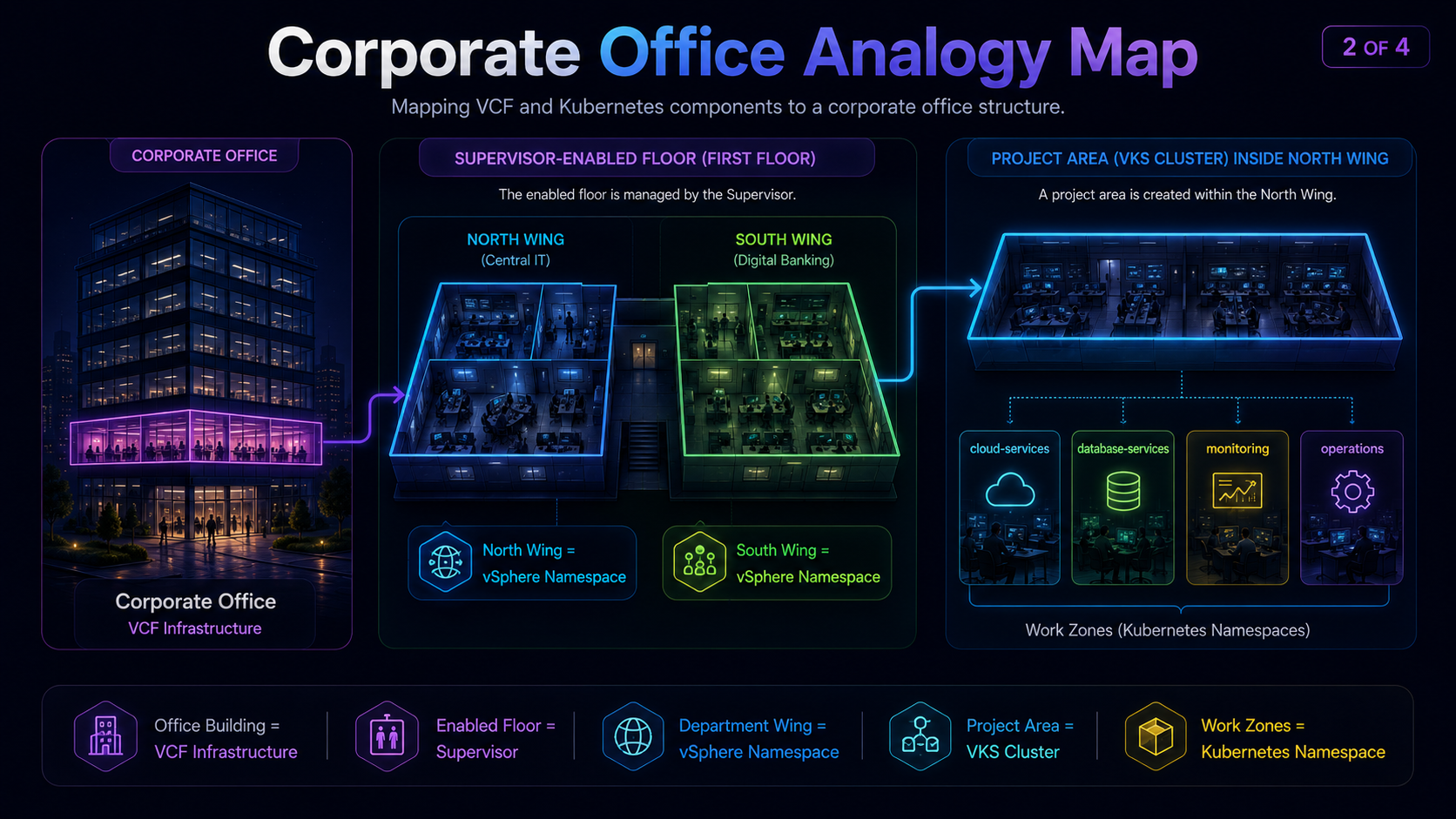
Carry the office model forward
Think of a large corporate office building with floors, wings, power, network cabling, security access, storage, shared services and operating rules. That is the VCF infrastructure.
One floor is enabled for governed self-service workspaces: the Supervisor. Its wings have their own access rules, resource limits, approved services and workstation sizes: vSphere Namespaces.
Blog 4 moves from definition to design: how to define each vSphere Namespace, how resilient the Supervisor control plane must be, and whether one or three Management Zones are needed.
Blog 4 design questions
- How should teams, applications and environments be separated into governed vSphere Namespace boundaries?
- Does the Supervisor need one control-plane VM or three for production resilience?
- Should the design use one Management Zone or three to protect against a zone or cluster failure?
These are connected but distinct architecture decisions. The answers depend on ownership, access, capacity, availability requirements, failure domains, storage, networking, lifecycle and risk.
02 · Choose the vSphere Namespace boundary
Create a separate vSphere Namespace when the rules are different.
Do not begin with a fixed rule such as “one vSphere Namespace per team.” Begin with a simpler question:
If the answer is no, they probably should not share the same vSphere Namespace.
One vSphere Namespace per application
Useful when an application needs its own capacity, storage, access and change control.
One vSphere Namespace per team
Useful when related applications have the same owners and platform rules.
One vSphere Namespace per environment
Development, test and production receive separate controls.
Shared vSphere Namespace
Several workloads share one boundary to keep operations simple.
These are design patterns, not mutually exclusive templates. vSphere Namespace design follows the workload requirements and can combine patterns—for example, one vSphere Namespace per application and per environment, such as payments-prod and payments-nonprod.
03 · Design the namespace entitlement
A namespace is the package of platform choices a team is allowed to consume.
In the office analogy, the platform team does not simply hand over an empty wing. It decides what comes with the wing.
| Design item | Technical meaning |
|---|---|
| Capacity | CPU, memory and storage limits available through the namespace. |
| VM Classes | Compute shapes available for VKS nodes and supported VM workloads. |
| Storage policies | Storage capabilities and placement options exposed to workloads. |
| Network choices | Namespace networking, reachable networks and platform network services. |
| Services | Approved Supervisor services and platform capabilities. |
| Identity | Users, groups and platform-level permissions. |
| Zones | Eligible infrastructure placement and failure domains. |
04 · Two access layers
An access card to the wing is not the same as access to every room inside it.
vSphere Namespace access
Controls who may consume or administer the platform boundary: create VKS clusters, use assigned services, inspect resources or change approved settings.
Kubernetes RBAC inside VKS
Controls who may create Deployments, Services, Secrets and other Kubernetes resources inside the cluster.
A developer can have broad permissions in one Kubernetes namespace while having no permission to change the vSphere Namespace quota or zone mapping. Conversely, a platform engineer can manage the outer boundary without being an administrator of every application inside every VKS cluster.
05 · Understand zones
A vSphere Zone is a placement choice backed by infrastructure.
Start with the office concept. One eligible building means the team can run only in that building. Three eligible buildings give the team three possible placement domains. This is about where workloads may run; it does not by itself make the application highly available.
How this translates to vCenter
The same idea appears as a namespace’s eligible vSphere Zone mappings. Select a Supervisor, then a vSphere Namespace, to see the infrastructure zones available to that namespace.
06 · Simplify the design decisions
Choose control-plane availability before choosing zones.
These are separate design decisions. Do not use the number of Management Zones as shorthand for the number of Supervisor control-plane VMs.
Step 1 · Supervisor availability
The Supervisor control plane is the platform's control tower: it manages namespaces, policy and cluster lifecycle. This choice is about keeping that control tower available; it is not yet about where application workloads run.
One control-plane VM means one Supervisor "brain". It is the simplest design, suited to a lab, demo, evaluation or lower-criticality environment where a temporary loss of platform management is acceptable.
Three control-plane VMs means three cooperating Supervisor VMs. If one VM or its host fails, the remaining two keep a majority and the Supervisor remains available. This is the normal production HA choice.
Step 2 · Zone layout
Only after choosing one or three control-plane VMs, choose one or three Management Zones, then decide whether workloads share them or use separate, dedicated vSphere Zones.
07 · The four zone design models
Combine the two zone decisions and the four patterns become easy to understand.
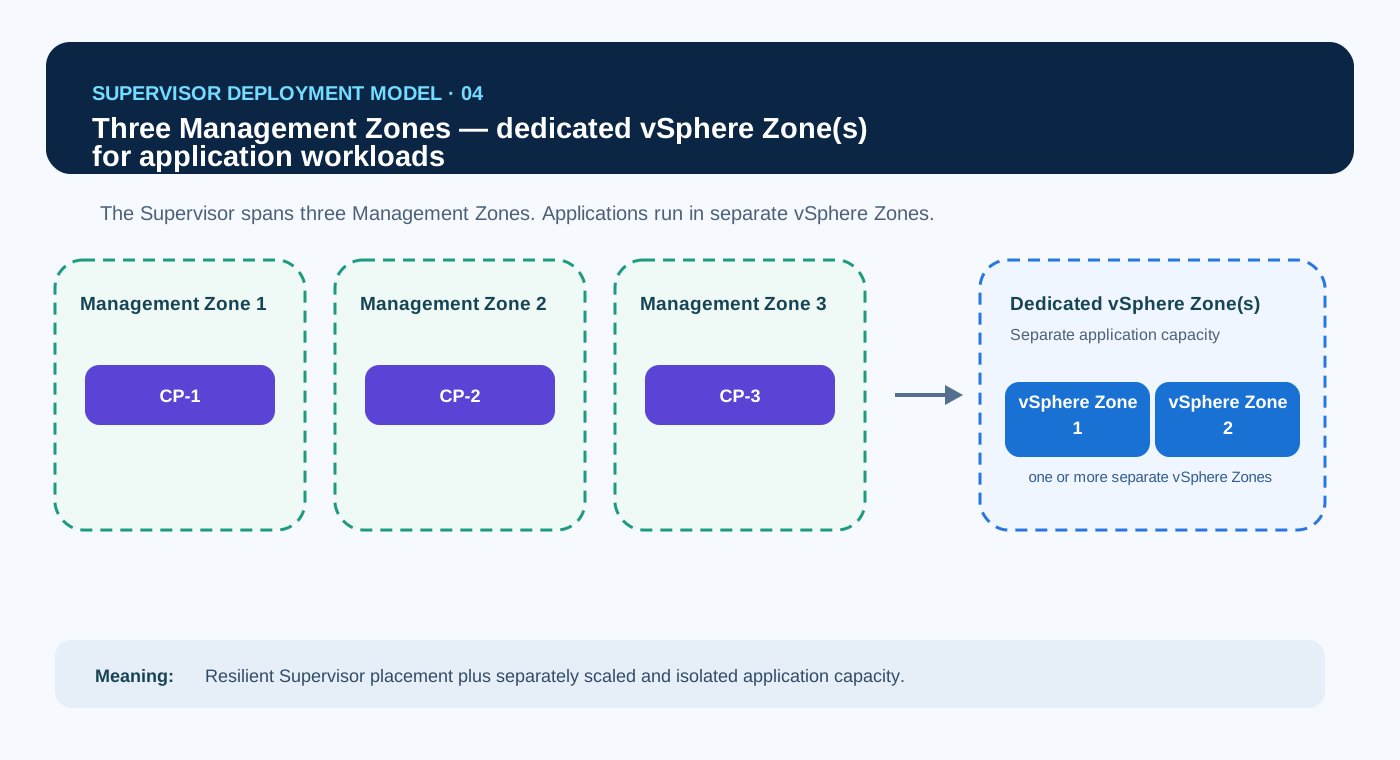
First choose Supervisor control-plane availability. Then choose one or three Management Zones, and decide whether application workloads share Management Zone capacity or use dedicated vSphere Zones.
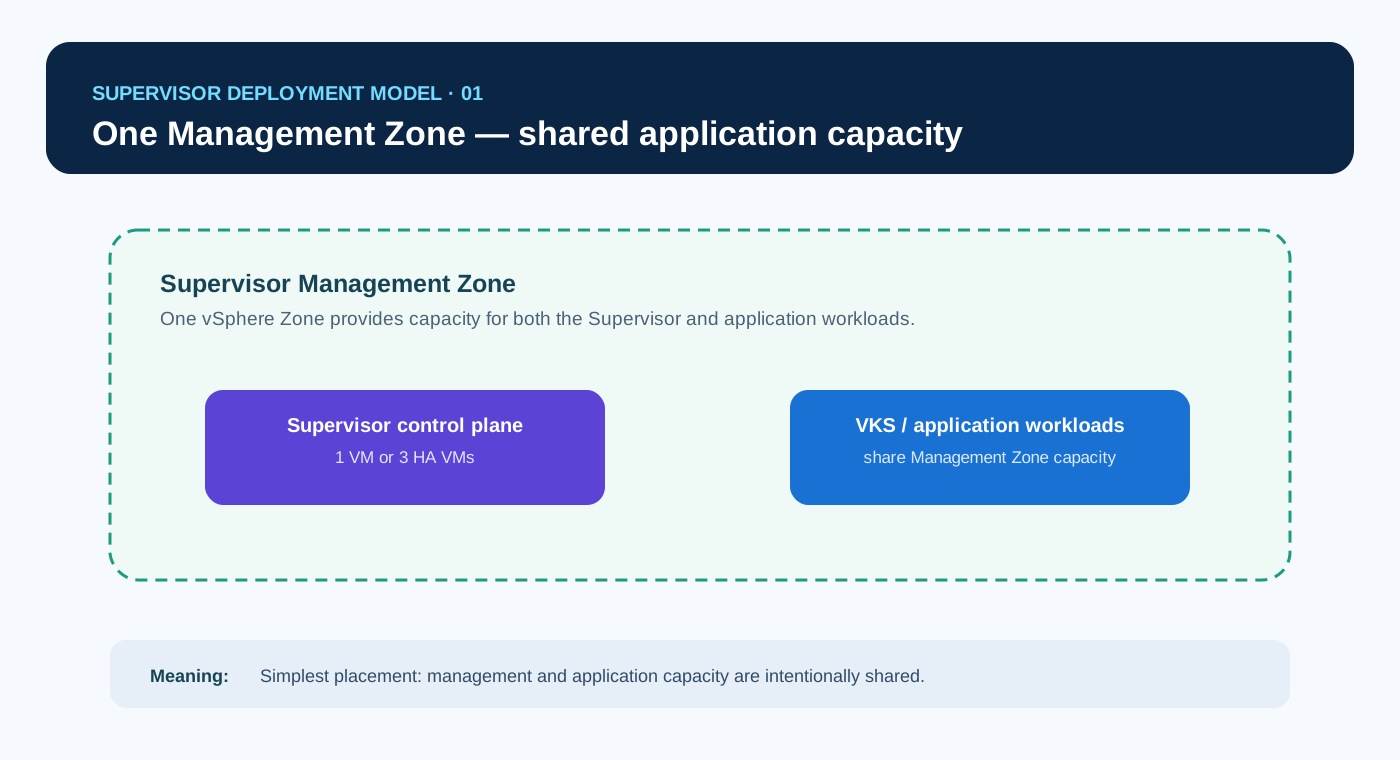
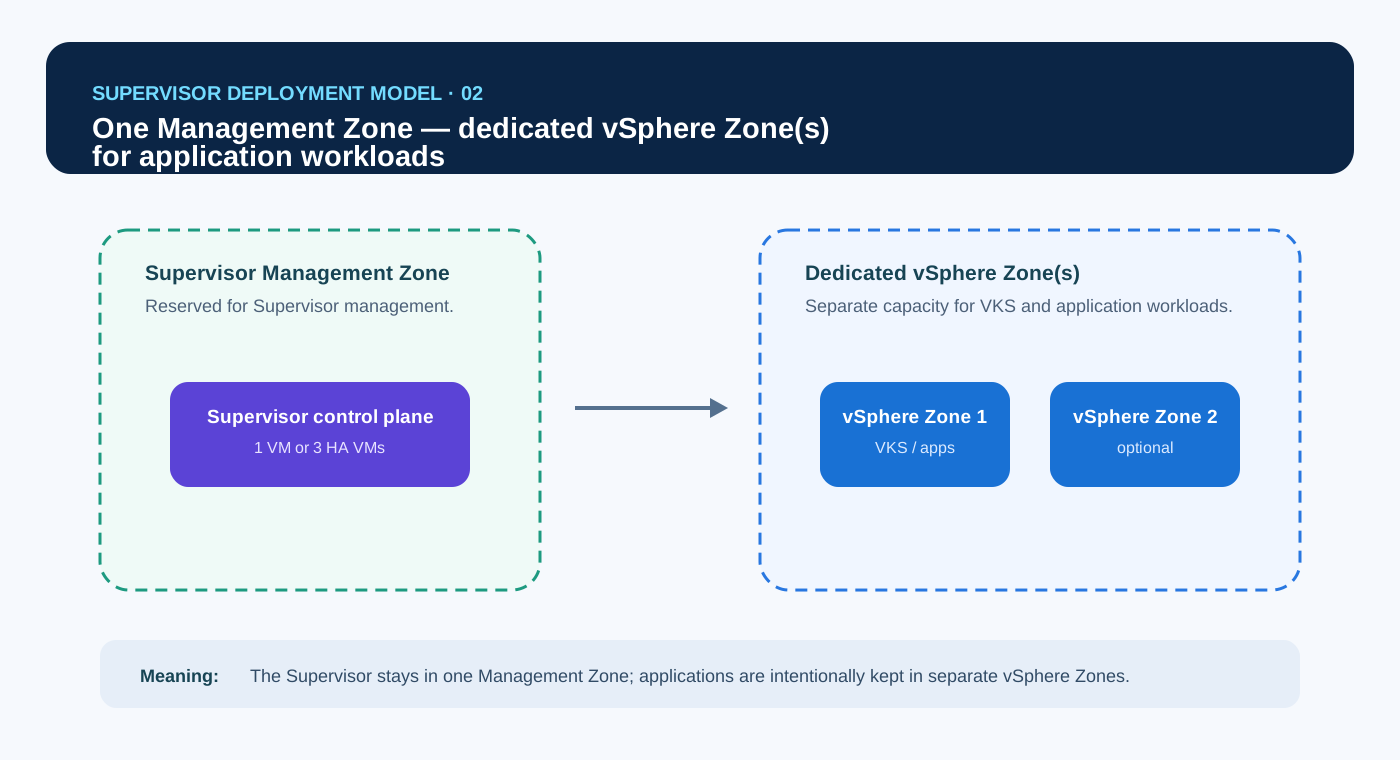
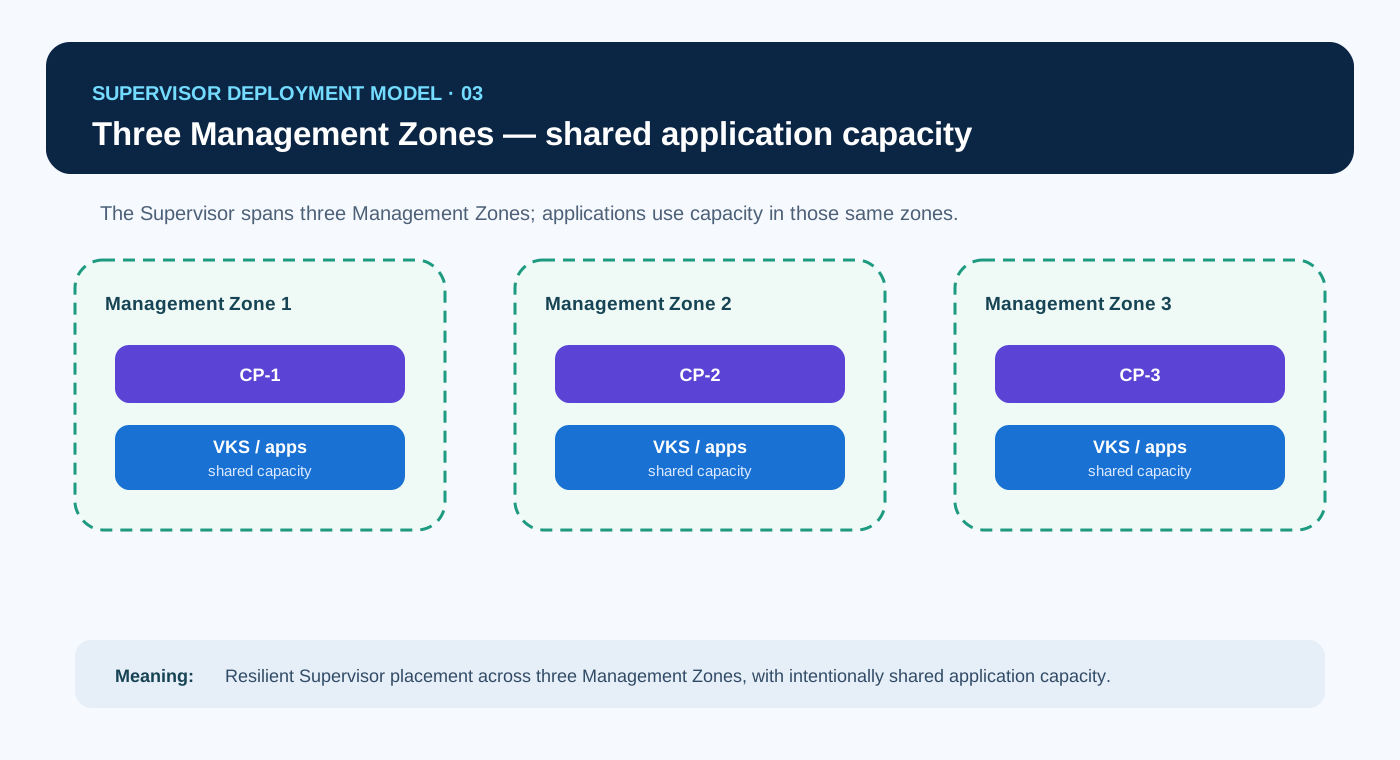
| Model | Best fit | Main trade-off |
|---|---|---|
| 1 · One management zone, combined | Labs, development, smaller environments | Simple, but management and workloads share the same domain. |
| 2 · One management zone, isolated workloads | GPU, performance or dedicated workload domains | Workloads are separated, but management capacity remains in one zone. |
| 3 · Three management zones, combined | General enterprise production | Can protect the control plane from a zone loss when one control-plane VM runs in each zone; infrastructure is still shared. |
| 4 · Three management zones, isolated workloads | Large or regulated platforms | Strongest separation with the highest cost and operational complexity. |
08 · Map vSphere Namespaces to zones
Zone mapping says where a workload may run. It does not guarantee that it will survive a failure.
A vSphere Namespace mapped to one zone is restricted to that infrastructure domain. A vSphere Namespace mapped to multiple zones receives more eligible placement domains.
For Payments to tolerate a zone-level failure, more work is still required: VKS control-plane and worker placement, application replicas, topology spread or affinity rules, storage accessibility, load-balancer reachability and application failure handling must all use the available zones correctly.
09 · Real design walkthrough
Payments, Risk Analytics and Reporting should not share one namespace.
They have different owners, risk levels, compute profiles, storage needs and availability targets.
payments-prod
Critical production serviceThree zones, resilient storage, production VM Classes, restricted access.
3 production zonespayments-nonprod
Developer testingSmaller VM Classes, lower-cost storage, developer access.
1 general zonerisk-analytics
Specialised analyticsAccelerator-enabled VM Classes, sensitive-data controls and dedicated capacity.
Dedicated Accelerator vSphere Zonereporting
Lower criticalityGeneral-purpose compute and cost-optimised storage.
1 zone initially| Requirement | Likely design response |
|---|---|
| Different access groups | Use separate namespaces. |
| Different storage or VM Classes | Usually use separate namespaces so each receives a clean entitlement. |
| Specialised accelerator infrastructure | Map the namespace to a Dedicated Accelerator vSphere Zone. |
| Production versus non-production | Separate namespaces to keep access, quota and change control independent. |
| Zone-failure tolerance | Use multi-zone placement plus correct VKS, application, network and storage design. |
| Same owners and same rules | A shared namespace may be reasonable. |
10 · Responsibility boundary
The platform team designs the outer boundary. The application team uses it correctly.
Platform team
- Creates namespaces
- Publishes VM Classes and storage policies
- Assigns access and quota
- Designs zones and placement
- Operates Supervisor and infrastructure
Application / DevOps team
- Creates and operates VKS clusters
- Designs Kubernetes namespaces and RBAC
- Sets pod requests and limits
- Spreads replicas correctly
- Owns application availability and data protection
11 · VCF 9.1 context
VCF 9.1 makes the surrounding platform more capable, but the design principles stay the same.
Current VCF 9.1 material adds important context around the namespace:
- VCF Automation 9.1 can capture a vSphere Namespace as a reusable blueprint through AppStack Formation.
- Namespace creation can be delegated with governance guardrails in VCF Automation.
- VPC Network Span gives administrators more precise control over which vCenter clusters can see and host VPC subnets.
- VKS in VCF 9.1 adds scale, placement and multi-network enhancements.
These features improve automation and placement control. They do not remove the need to decide where the real policy, access, capacity and failure boundaries belong.
12 · Knowledge check
Test the design decisions, not only the definitions.
1. Payments production and development use different access groups, storage and change windows. What is the cleaner design?
2. What does mapping a namespace to three zones provide?
3. Which two choices create the four supported zone design patterns?
4. Where should a developer's access to Deployments and Services be controlled?
5. When may a shared namespace be reasonable?
13 · Architecture challenge
Apply the same design method to a different platform scenario.
First choose the Supervisor availability model; then decide each workload's namespace boundary, entitlement and zone placement.
Scenario
A financial-services organisation wants to onboard four workload profiles to VKS:
Business-critical, tightly controlled, low-latency and expected to continue operating during a single infrastructure-zone failure.
Requires accelerator-enabled VM Classes, burst capacity and access to sensitive market datasets.
Used by several engineering teams for short-lived test clusters, standard VM Classes and lower-cost storage.
Lower compute demand, strict retention controls and storage policies designed for long-term record keeping.
- Choose the Supervisor control-plane availability model: one control-plane VM for evaluation/non-critical use, or three control-plane VMs across three Management Zones for production resilience. State why.
- Choose the zone model: one or three Management Zones, with shared Management-Zone capacity or dedicated vSphere Zone(s) for application workloads.
- Decide which workloads require separate vSphere Namespaces.
- Define the main entitlement and eligible vSphere Zone(s) for each namespace.
- State what the application teams must still design inside their VKS clusters.
Reveal one reasonable design
- Namespace boundary
- Separate namespace:
trading-prod - Entitlement
- Restricted operators, production VM Classes, low-latency networking, resilient storage and production quota.
- Zone placement
- Eligible across three production vSphere Zones; dedicated capacity is optional unless additional infrastructure isolation is required.
- Namespace boundary
- Separate namespace:
quant-research - Entitlement
- Accelerator-enabled VM Classes, sensitive-data access, burst quota and approved high-performance storage.
- Zone placement
- Dedicated Accelerator vSphere Zone because the infrastructure capability itself is specialised.
- Namespace boundary
- Separate namespace:
developer-platform - Entitlement
- Developer access, standard VM Classes, lower-cost storage and controlled sandbox quota.
- Zone placement
- Shared general-purpose capacity; no dedicated vSphere Zone is required by default.
- Namespace boundary
- Separate namespace:
compliance-archive - Entitlement
- Restricted access, archival storage policies, modest compute and retention-aligned quota.
- Zone placement
- May share general-purpose capacity if storage and retention requirements are met; dedicated capacity is not automatically justified.
14 · Key takeaways
Design the boundary first. Add complexity only when the requirement earns it.
- Reuse the Blog 3 hierarchy: building → enabled floor → department wing → VKS project area → Kubernetes work zones.
- Create separate namespaces when access, capacity, storage, networking, lifecycle or risk differ.
- Treat a namespace as an entitlement package, not an inventory folder.
- Keep platform access and Kubernetes RBAC as separate layers.
- Choose Supervisor control-plane availability separately from the zone model.
- Understand the four zone models through two questions: one or three Management Zones, and shared Management Zone capacity or dedicated vSphere Zones for application workloads.
- Multi-zone mapping provides placement choices, not automatic application availability.
- Start with the simplest design that meets the requirement.